


Configure Zebra Scanners to Send a Tab Key
Learn how to configure compatible Zebra laser and 2D barcode scanners to automatically send a Tab character after scanning.
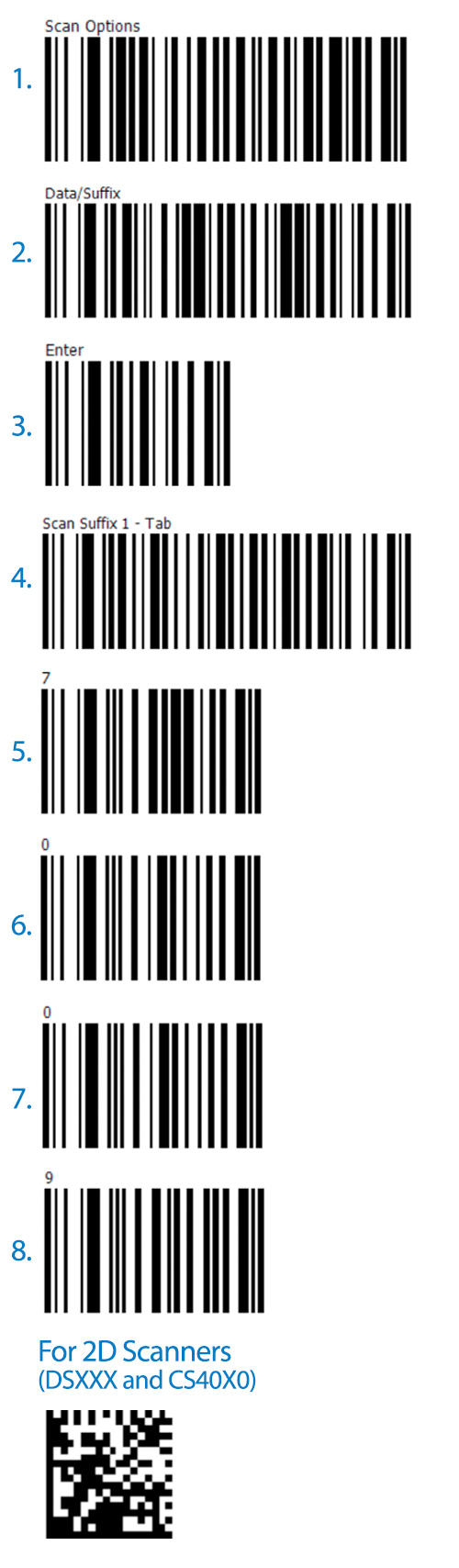
Need your Zebra barcode scanner to send a Tab key character after each scan? Use the configuration barcode below to help set up your scanner for your application.
This guide applies to compatible Zebra laser scanners and 2D barcode scanners. Follow the configuration instructions shown in the image.
Scanner Configuration Guide
Locate the appropriate configuration barcode in the guide below and scan it with your Zebra scanner to apply the desired Tab key setting. Refer to the image for the configuration sequence.
From Fortune 500 companies to your small business, 125,000+ companies trust our products, service, and support.









Need Help Configuring Your Zebra Scanner?
Not sure which configuration applies to your scanner or application? BarcodeFactory can help you find the right scanning solution.
Call 888-237-8525 or contact our team for assistance.
For more information or to discuss your project, Contact Us or call 888-237-8525.