


VIPColor VP610 Replacement Options
Find a color label printer that fits your next step.
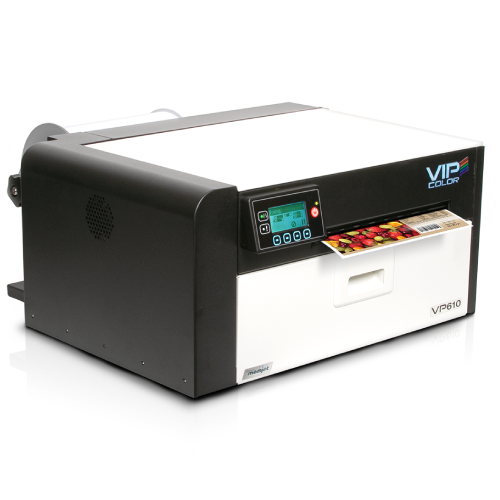
Looking for the VP610? Barcode Factory no longer sells VIPColor products. Start with the Epson ColorWorks CW-C6000 for 4-inch-class production labeling. If throughput and longer runs are the priority, also review the CW-C8000.
Compare print width, daily volume, label delivery and supplies before choosing your replacement.
The VP610 Is No Longer Sold Here
Barcode Factory has discontinued sales of VIPColor products. This page helps VP610 shoppers evaluate another color printing option based on their application.
Start with width: the VP610 supported printing up to 8.5 inches wide. The CW-C6000 supports printing up to 4.25 inches wide. It does not replace the VP610’s full-width capability; wider designs require a different printer.
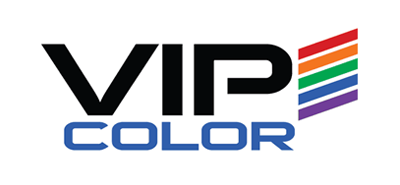
Epson ColorWorks CW-C6000
A 4-inch-class color label printing option with auto-cutter and peel-and-present configurations. Review it for product variations, variable data and production labeling when its print width fits your designs.
Detailed Color Output
Up to 1200 × 1200 dpi resolution for label artwork, text and barcodes. Evaluate a sample using your actual design and label material.
Label Delivery Options
Choose the CW-C6000A for an auto cutter or the CW-C6000P for peel-and-present operation. Review how labels will be collected or applied in your workflow.
Ink & Media Selection
Review the pigment ink system and available gloss or matte black ink configurations with compatible label stock before ordering.
Replacing the printer also means reviewing the workflow. Check label stock, ink, drivers, templates and any connected label handling equipment. Confirm compatibility before reusing existing supplies or production settings.
Choose Around Your Production Needs
The CW-C6000 and CW-C8000 serve different workflow priorities. Compare the complete setup and expected output using your own labels.
| Consideration | Epson CW-C6000 | Epson CW-C8000 |
|---|---|---|
| Starting Point | Review when cutter or peel-and-present operation is central to the workflow. | Review when higher-volume output and production throughput are the main priorities. |
| Maximum Print Width | 4.25 inches | 4.25 inches |
| Label Delivery | CW-C6000A auto-cutter or CW-C6000P peel-and-present configurations. | Auto-cutter configuration. Review any downstream label handling requirements. |
| Production Review | Check output at the required resolution, label size and run length. | Check throughput with your artwork, media, print settings and finishing process. |
| Supplies | Choose compatible label stock and the correct ink configuration. | Review the model-specific ink pack system and compatible label stock. |
Neither model covers the VP610’s full 8.5-inch print width. Share your widest artwork before choosing a replacement.
Compare Your VP610 Application
Use your current labels and production requirements as the basis for the replacement decision.
| What to Check | CW-C6000 Consideration |
|---|---|
| Print Width | Maximum print width is 4.25 inches. If your artwork needs more width, review a wider model such as the CW-C6500, which prints up to 8.34 inches. |
| Label Stock | Confirm finished label dimensions, media width, roll and core sizes, coating, sensing method and adhesive. |
| Daily Volume | Share typical run lengths, peak demand and artwork coverage. Review expected throughput for your production schedule. |
| Finish & Durability | The VP610 used dye inks; the CW-C6000 uses pigment inks. Test the new ink-and-media combination for your actual moisture, handling and finish requirements. |
| Software & Data | Review drivers, label templates, variable fields and system connections. ZPL II compatibility still requires testing of your commands and label output. |
| Label Delivery | Select the auto-cutter or peel-and-present model. Confirm media suitability and compatibility with any rewinder, dispenser or applicator. |
Explore the ColorWorks Product Family
This related C6500 video introduces ColorWorks color label printing. Review the CW-C6000 specifications separately for its print width and configuration options.
Send Us a Sample Label
A printed sample or artwork file helps our team understand what your replacement needs to produce.
- Label dimensions and current material
- Typical daily quantity and largest production runs
- Graphics, small text, barcodes and variable fields
- Required durability and label finish
- Existing software and finishing equipment
Choose Around Your Application
Our specialists can help you review the printer, ink and media as a complete setup. For longer runs, we can help compare the CW-C8000. If your VP610 application needs wider labels, we can review the CW-C6500 or another option against your artwork and production requirements.
Confirm the final configuration and evaluate printed output before committing to a full supply changeover.
Need Help Moving On From the VP610?
Tell us what you print and what you need to keep working. We can help you assess whether the CW-C6000, CW-C8000 or a wider printer fits your application.
Trusted by Businesses Nationwide
From Fortune 500 companies to your small business, 125,000+ companies trust our products, service, and support.










Our Top Partners
Barcode Factory is a premier partner with the industry's leading hardware, media, and software providers. We give our customers access to proven products, services, and resources for labeling and data capture applications.
Shop by Brands




For more information or to discuss your project, Contact Us or call 888-237-8525.